 CollectorCtrl
Fleet Configuration Templates & Drift Governance
Data Plane Governance
Structural Pattern Discovery, Fingerprinting & Evolution Auditing
In dynamic enterprise environments spanning Kubernetes clusters, cloud instances, and on-prem bare metal, OpenTelemetry collector pipelines are prone to configuration drift. Ad-hoc troubleshooting edits, divergent CI/CD scripts, and unversioned local modifications cause edge collectors to slowly deviate from central architectural and compliance baselines.
CollectorCtrl's Template Discovery & Drift Governance continuously fingerprints the runtime structural configurations of every connected collector, clusters fleet configurations into canonical patterns, monitors real-time configuration evolution, and provides side-by-side visual diffs to audit and remediate unauthorized drift.
1. Fleet Configuration Templates Console
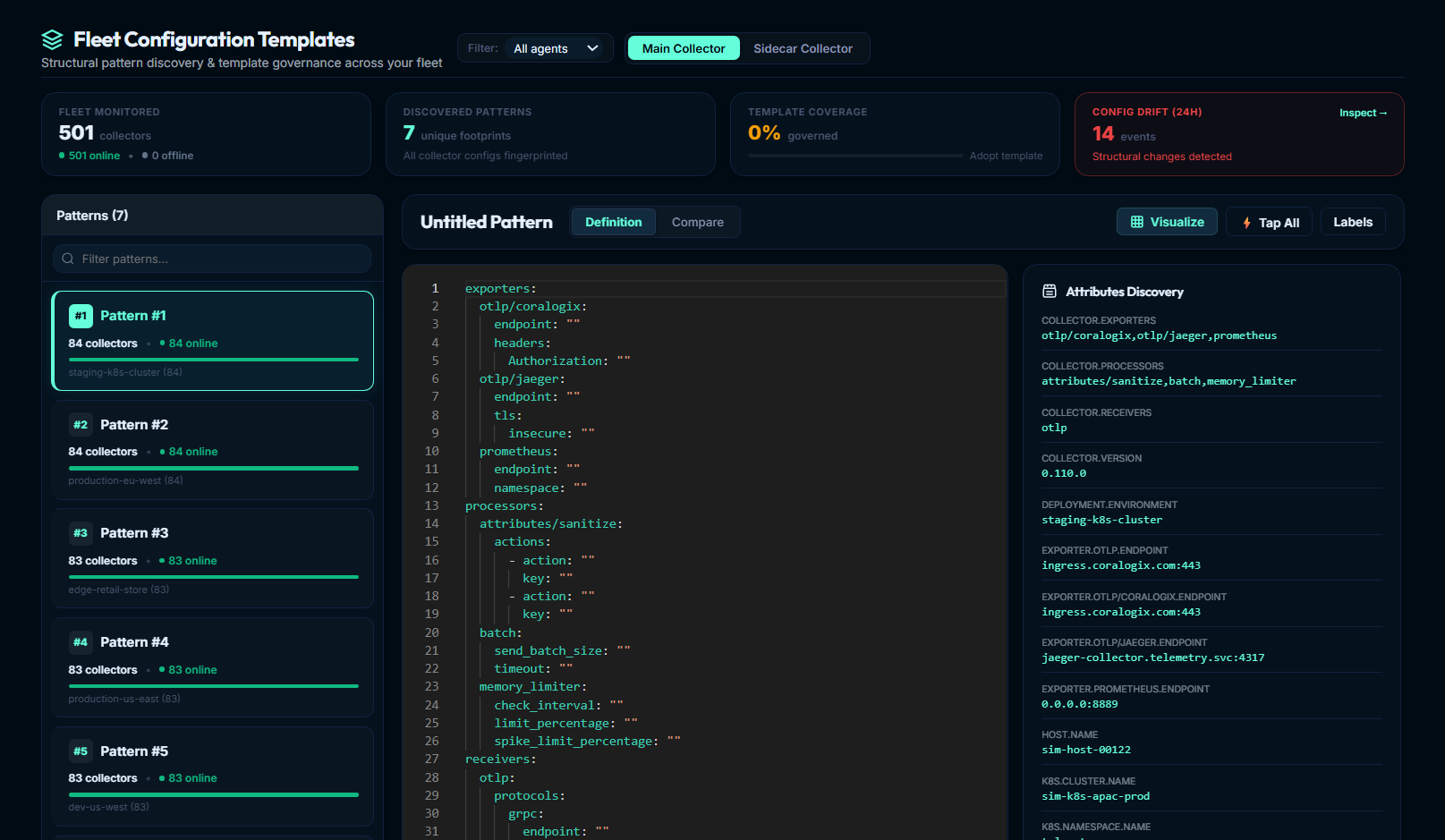
The Fleet Configuration Templates console provides an executive, fleet-wide summary of all configuration footprints operating across your infrastructure.
 Expand
The Executive 4-KPI Summary Strip
The top of the console features four live operational indicators:
- Fleet Monitored: Real-time census of all monitored collectors or sidecars, categorized into online (actively connected via OpAMP) and offline nodes.
- Discovered Patterns: Total count of unique structural footprints fingerprinted across the monitored fleet. In a standardized deployment, hundreds of nodes collapse into just a handful of canonical patterns.
- Template Coverage (% Governed): The percentage of active collectors running an officially labeled, approved governance template. If coverage falls below 80%, the system flags an Adopt template recommendation; at or above 80%, it reports Standardized.
- Config Drift (24h): The total number of structural configuration transitions detected across your fleet in the last 24 hours. When structural changes occur, the card illuminates in warning red with an active
Inspect ➔button that opens the Configuration Drift & Evolution workspace.
Scope & Collector Type Controls
- Main vs. Sidecar Collector Switch: Toggle seamlessly between Main Collector (host-level daemons and Kubernetes DaemonSets) and Sidecar Collector (per-pod sidecar containers).
- Connectivity Filter: Filter the template analysis by All collectors, Online only, or Offline only.
2. Canonical Fingerprinting & Structural Hashing
Managing thousands of full raw YAML files in an enterprise control plane creates massive storage redundancy and prevents easy comparison. CollectorCtrl resolves this using an automated canonical normalization and structural hashing pipeline:
┌─────────────────────────────────────────────────────────────────────────────────────────────────────────┐
│                                CANONICAL STRUCTURAL HASHING PIPELINE                                    │
├─────────────────────────────────────────────────────────────────────────────────────────────────────────┤
│                                                                                                         │
│  [ Agent Runtime config.yaml ]                                                                          │
│                 │                                                                                       │
│                 ▼                                                                                       │
│  [ Structural Normalizer ]                                                                              │
│    • Strips comments, empty whitespace, and formatting nuances                                          │
│    • Masks sensitive credentials (tokens, bearer auth, API secrets)                                     │
│    • Normalizes dynamic host-specific values (IPs, hostnames, ports)                                    │
│                 │                                                                                       │
│                 ▼                                                                                       │
│  [ Canonical AST & Lexical Sorter ]                                                                     │
│    • Generates deterministic key ordering across receivers, processors, exporters, service pipelines   │
│                 │                                                                                       │
│                 ▼                                                                                       │
│  [ Cryptographic SHA-256 Fingerprint ]                                                                  │
│    • Example: ee1ea66a7b39f...                                                                          │
│                 │                                                                                       │
│                 ▼                                                                                       │
│  [ Fleet Pattern Cluster ] (Groups all identical structural topologies under a single template)        │
│                                                                                                         │
└─────────────────────────────────────────────────────────────────────────────────────────────────────────┘
Structural Grouping vs. Value Grouping
The normalizer extracts the pipeline topology and structural contracts rather than literal character strings. For example:
- Host A in
us-east-1hasendpoint: ingress-east.corp.internal:443 - Host B in
eu-west-1hasendpoint: ingress-west.corp.internal:443
Because both hosts share the exact same receiver chain, processor order (batch, memory_limiter, attributes/sanitize), and exporter types (otlp, prometheus), CollectorCtrl groups them under the same structural pattern. This allows platform teams to govern pipeline architectures at massive scale without getting bogged down in environment-specific configuration values.
3. Discovered Pattern Explorer & Workspace
The left panel ranks discovered structural patterns by fleet adoption, displaying the collector count, online ratio, and primary cluster environments (e.g., #1 Pattern #1: 84 collectors (84 online) · staging-k8s-cluster).
Selecting any pattern opens the central workspace:
Integrated Pattern Actions
DefinitionMode: Monaco editor displaying the syntax-highlighted canonical YAML definition of the structural pattern.CompareMode: Diff against another pattern or an official baseline, computing line additions, deletions, and percentage similarity.⊞ Visualize: Launches the interactive OpenTelemetry Directed Acyclic Graph (DAG) topology visualizer, showing data flow from receivers through processors to exporters.⚡ Tap All: Launches a centralized Telemetry Governor non-invasive stream tap across all collectors belonging to this template cluster simultaneously.Labels: Assign human-readable names (e.g.,Standard Kubernetes Ingress Collector), environment tags (production,pci-compliant), and designate the pattern as an Official Template.
Attributes Discovery
The right panel automatically aggregates runtime operational attributes observed across all collectors that match the selected structural pattern:
COLLECTOR.EXPORTERS: e.g.otlp/coralogix, otlp/jaeger, prometheusCOLLECTOR.PROCESSORS: e.g.attributes/sanitize, batch, memory_limiterCOLLECTOR.RECEIVERS: e.g.otlpCOLLECTOR.VERSION: e.g.0.110.0DEPLOYMENT.ENVIRONMENT: e.g.staging-k8s-clusterEXPORTER.OTLP.ENDPOINT: e.g.ingress.coralogix.com:443HOST.NAME&K8S.CLUSTER.NAME: Exemplar host and Kubernetes cluster identifiers.
4. Configuration Drift & Evolution Auditing
Whenever a collector at the edge reports a new effective configuration, CollectorCtrl compares the calculated canonical hash with the agent's prior recorded hash:
Drift Triggered if: Canonical_Hash(new) ≠ Canonical_Hash(old)
When drift occurs, a TemplateDriftEvent is recorded in the audit store, incrementing the Config Drift (24h) counter.
Inspecting Drift Transitions
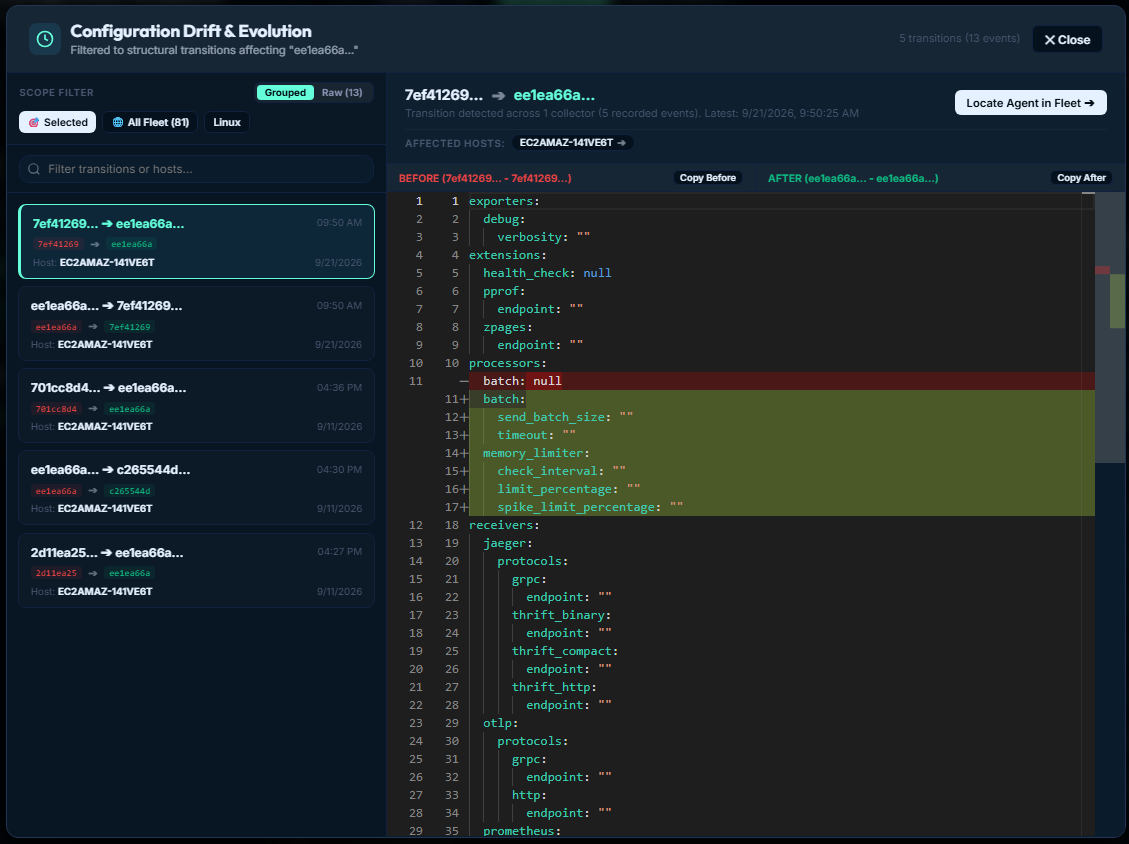
Clicking Inspect ➔ on the Config Drift card opens the Configuration Drift & Evolution workspace:
 Expand
Core Inspector Features
1. Grouped vs. Raw Inspection Modes
- Grouped Mode: Consolidates identical structural transitions across nodes (e.g.
7ef41269... ➔ ee1ea66a...detected across 1 collector, 5 recorded events). - Raw / Timeline Mode: Chronological event-by-event audit log of every edge collector configuration modification with precise timestamps.
2. Dynamic Scope Filtering
Filter drift events by 🎯 Selected Template, 🌐 All Fleet, or environment chips (e.g. Linux, Windows, specific Kubernetes clusters). Use the search bar to locate transitions by hostname or Agent UUID.
3. Side-by-Side Monaco Diff Engine
The inspector displays a visual diff between the BEFORE and AFTER configurations:
- Red Deletion Lines: Removed components or parameters (e.g.
- batch: null). - Green Addition Lines: Injected processors or exporters (e.g.
+ memory_limiter:and parameterized+ batch:). - Secret Masking: All API keys, tokens, and sensitive headers are masked automatically.
- One-Click Clipboard: Dedicated Copy Before and Copy After buttons allow exporting YAML chunks for offline analysis.
4. 1-Click Agent Drill-Down
Click Locate Agent in Fleet ➔ or select an affected host chip (e.g. EC2AMAZ-141VE6T ➔) to jump directly to that collector's detailed operational panel in Fleet Overview.
5. Remediation Workflows: Aligning Drifted Fleets
Once configuration drift is identified, platform engineers can resolve it through two primary operational paths:
Path A: Adopting Legitimate Evolution
Path B: Enforcing Policy Realignment
6. Enterprise Governance & GitOps Integration
Establishing Golden Baseline Templates
Designate foundational templates for your standard operating tiers:
- Kubernetes DaemonSet Baseline: Standardized OTLP receiver, daemonset memory limiter, and cluster metrics exporter.
- Windows Server IIS Tier: Specialized Windows event log receivers, IIS counters, and rate-limiting batch processors.
- Edge / IoT Gateways: Lightweight forwarders with strict memory limits and offline disk buffering.
Automated Notifications & Drift Webhooks
CollectorCtrl can dispatch real-time alerts via Webhooks, Slack, or PagerDuty when:
- An unapproved collector introduces new uncataloged exporters.
- A critical security or sanitization processor is removed from an active pipeline.
- Fleet template coverage drops below a defined compliance threshold (e.g.
< 90%).