 CollectorCtrl
OpenTelemetry Fleet Overview & Central Control
The Fleet Overview console is the central nervous system of CollectorCtrl. It provides real-time visibility, live health metrics, configuration analysis, and process control for every connected OpenTelemetry Collector across your global infrastructure.
1. The Fleet Inventory Dashboard
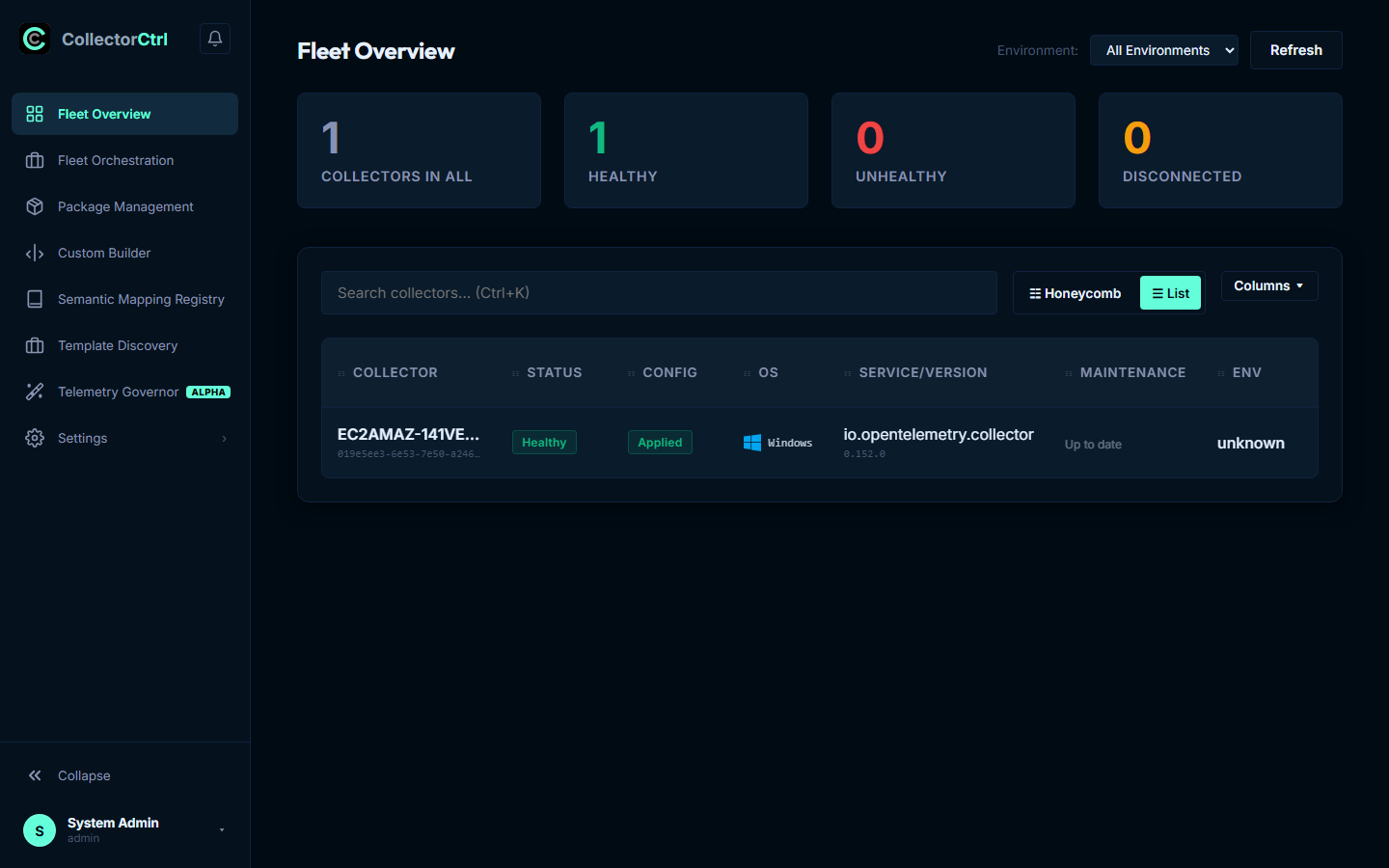
The dashboard provides a real-time list of all active and historical agents. Each agent node reports its telemetry profile through OpAMP, allowing CollectorCtrl to dynamically resolve and render key host and pipeline details.
 Expand
Metadata Resolution Priority
To keep your fleet organized without manual tagging, the inventory screen resolves agent names and environments automatically:
- Display Name Resolution: Resolved using the priority order:
host.name(system hostname)otel.collector.display_name(custom user attribute)Instance ID(cryptographic agent UUID fallback)
- OS & Runtime Detection: Checks the agent's reported OS indicators (
os.type,host.os, oros.description). The UI renders dedicated system badges for Windows, Linux, macOS, and container environments. - Environment Mapping: Evaluates user-defined rules to assign the agent to environments (e.g.
production,staging,development).
2. Configuration Management
CollectorCtrl provides a centralized, multi-layered configuration management suite designed to eliminate manual SSH edits and Git divergence across hundreds or thousands of collectors. Within any collector node's details view, the configuration management suite provides two essential views: an Interactive Pipeline Topology visualization and the Dual-Layer YAML Compiler (Effective vs. Override).
a) Pipeline Topology
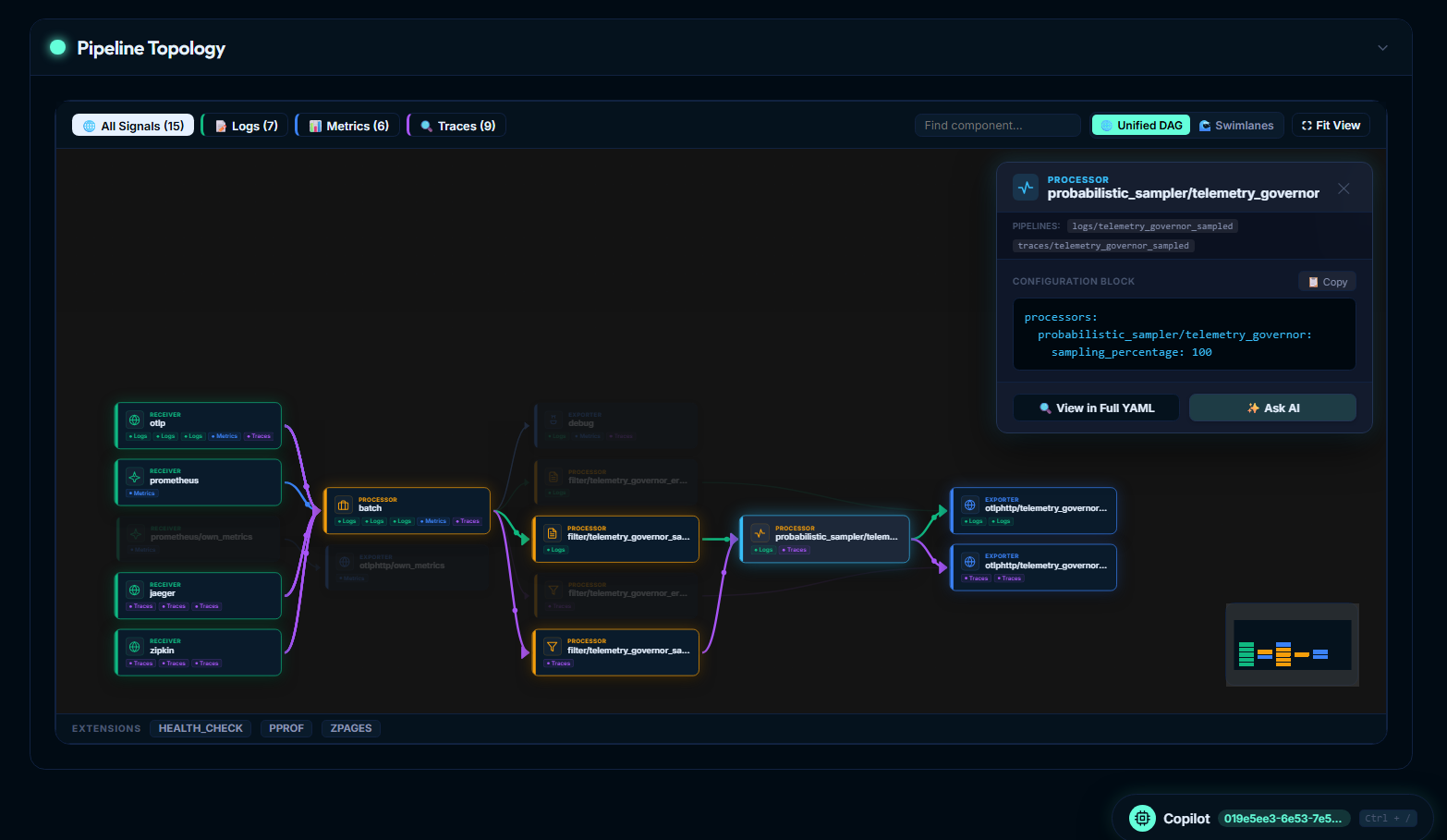
The Pipeline Topology engine automatically parses the running OpenTelemetry configuration and synthesizes a live, interactive Directed Acyclic Graph (DAG). Rather than manually deciphering complex nested YAML pipelines with dozens of receivers, filters, batchers, and multi-sink exporters, engineers can visually explore data routing and component relationships in real time.
 Expand
Usability & Architectural Value
Modern OpenTelemetry configurations in production environments often span hundreds of lines of YAML with concurrent trace, metric, and log pipelines. Common operational challenges include:
- Disconnected Processors: Processors declared in the YAML configuration that silently drop data because they were omitted from the
service.pipelinesdeclaration. - Mismatched Signal Routing: Pipelines where log telemetry is accidentally directed to trace exporters or vice versa.
- Bottlenecks in Sequential Processing: Processors chained inefficiently, causing unnecessary CPU spikes or queue backpressure.
The Pipeline Topology view eliminates this cognitive overhead by translating static YAML into an interactive, visual pipeline map that reflects runtime realities:
- End-to-End Telemetry Flow: Instantly trace how data ingests via Receivers (
otlp,prometheus,jaeger,zipkin), flows through intermediate Processors (batch,filter,probabilistic_sampler), and exits through destination Exporters (otlphttp,debug, or enterprise SaaS sinks). - Signal Isolation & Verification: Isolate specific telemetry streams to verify that metric pipelines remain decoupled from log processors.
- Pre-Deployment Visual Verification: Visually inspect proposed configuration edits before saving or promoting changes to production nodes.
Core Topology Features
-
Multi-Signal Filtering Tabs:
- Filter the topology graph instantly by clicking All Signals, Logs, Metrics, or Traces.
- Dynamic count badges (e.g.
Logs (7),Metrics (6),Traces (9)) indicate the exact number of active components involved in each signal category. Selecting a tab highlights active signal paths and dims unrelated nodes.
-
Interactive Component Inspector:
- Clicking on any component node (Receiver, Processor, or Exporter) opens a context-rich drawer on the right.
- Active Pipeline Membership: Lists every named pipeline in which this component participates (e.g.
logs/telemetry_governor_sampled,traces/telemetry_governor_sampled). - Component Configuration Block: Displays the exact YAML snippet for that component with syntax highlighting and a one-click Copy button.
- Direct Jump to Full YAML: Click View in Full YAML to jump directly to the component's line definition inside the full configuration editor.
- Integrated AI Troubleshooting: Click Ask AI to query the CollectorCtrl Copilot with this component's schema and configuration pre-loaded in memory.
-
Color-Coded Directed Flow:
- Flow connections are color-coded by signal type (emerald green for logs, cyan/teal for metrics, purple for distributed traces).
- Edge connectors visualize convergence (multiple receivers feeding into a shared batch processor) and fan-out (a processor routing into multiple parallel destination exporters).
-
Unified DAG vs. Swimlanes Layout:
- Unified DAG View: Deduplicates shared processors and shows convergent/divergent edges, ideal for understanding shared resource consumption and pipeline consolidation.
- Swimlanes View: Arranges each signal type (
logs,metrics,traces) into independent, horizontal tracks for linear end-to-end review.
-
Navigation, Search & Minimap:
- Quick Search (
Find component...): Instant filter to locate specific receiver, processor, or exporter names across massive configurations. - Fit View & Interactive Minimap: Pan and zoom smoothly across large enterprise collector topologies with the overview minimap radar.
- Quick Search (
-
Active Extensions Bar:
- Displays non-pipeline runtime extensions active on the host node, such as
HEALTH_CHECK(:13133),PPROF(:1777),ZPAGES(:55679), and authentication extensions (BEARER_AUTH).
- Displays non-pipeline runtime extensions active on the host node, such as
b) Effective vs. Override: The Dual-Layer Compilation Model
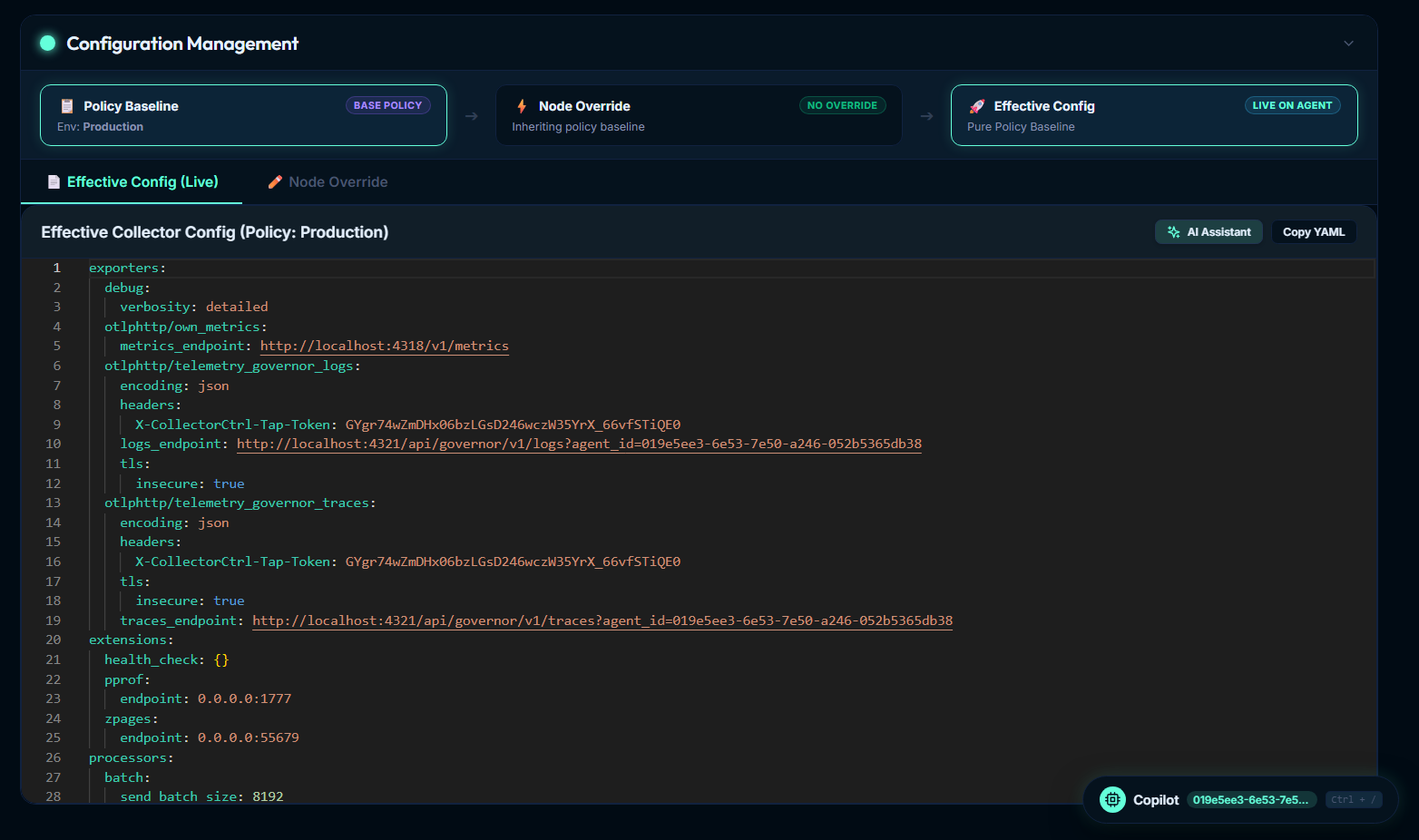
CollectorCtrl separates fleet configuration into two distinct layers: a central Policy Baseline and node-specific Override Configs. The control plane merges these layers on-the-fly to generate the final, executable Effective Config.
For a complete breakdown of config sources, badge indicators, 4-tier precedence, and GitOps synchronization, see our dedicated guide: Understanding Config Sources & Governance.
 Expand
Visual Merge Lineage & Compilation Breadcrumb
At the top of the Configuration Management panel, CollectorCtrl renders the visual compilation lineage:
[ 📄 Policy Baseline ] ──────► [ ⚡ Node Override ] ──────► [ 🚀 Effective Config ]
      Base Policy                  No Override / Delta             Live on Agent
    Env: Production            Inheriting Policy Baseline        Pure Policy Baseline
- Policy Baseline: The fleet-wide or environment-wide configuration template assigned to the agent based on classification rules (e.g.
Env: Production,Cloud: AWS). - Node Override: Local configuration deltas defined specifically for this individual host.
- Effective Config: The compiled, synthesized configuration currently running live in the agent's memory, certified with an OpAMP cryptographic SHA-256 hash.
Effective Config (Live)
The Effective Config is the absolute final, ready-to-run YAML configuration compiled by the control plane. It is the result of merging:
- The global policy template matching the agent's classification labels.
- Any environment-specific baseline parameters.
- Node-specific Override Configs.
Before transmitting to the agent over the persistent OpAMP WebSocket connection, the control plane executes a pre-flight schema dry-run (otelcol validate) to guarantee syntax validity. The agent reports back its effective configuration hash on every heartbeat, ensuring instant drift detection.
- Copy YAML: One-click clipboard copy of the entire compiled production YAML.
- AI Assistant: Instantly queries CollectorCtrl Copilot with the live configuration pre-attached to troubleshoot runtime issues or optimize pipelines.
Override Config
The Override Config empowers platform teams and site reliability engineers to define node-specific variations without cloning or bifurcating central fleet policies. This is essential for:
- Pointing a specific node to a localized egress proxy or staging gateway.
- Enabling debug logging on a problematic host without altering production fleet templates.
- Specifying host-unique certificates, local scrape ports, or custom resource attributes.
How Override Merging Works
When writing an override, you only specify the exact keys you wish to change or inject. CollectorCtrl performs a deep YAML merge, recursively overlaying your overrides on top of the Policy Baseline.
For example, if the parent policy template defines an OTLP receiver listening on default ports:
receivers:
  otlp:
    protocols:
      grpc:
        endpoint: 0.0.0.0:4317
      http:
        endpoint: 0.0.0.0:4318
To configure a specific host to listen on port 5317 for gRPC without altering HTTP or any other receiver, define only the delta in the Node Override:
receivers:
  otlp:
    protocols:
      grpc:
        endpoint: 0.0.0.0:5317
CollectorCtrl compiles these layers into an Effective Config where only endpoint: 0.0.0.0:5317 is updated, while preserving http: 0.0.0.0:4318 and all parent processors, extensions, and exporters.
Common Override Patterns
-
Overriding an Exporter Endpoint & TLS Certs:
exporters: otlp: endpoint: https://ingest.regional.internal:443 tls: ca_file: /etc/collectorctrl/certs/regional-ca.pem -
Enabling Verbose Debugging for Incident Investigation:
exporters: debug: verbosity: detailed -
Injecting Host-Specific Attributes:
processors:
  attributes:
    actions:
      - key: host.datacenter
        value: us-central-dc1
        action: insert
⚠ Do's & Don'ts for Override Configurations
| Do's | Don'ts |
|---|---|
| Keep it minimal: Only specify the exact keys that differ from the parent baseline. | Don't copy-paste the entire template: Avoid full-template duplications that hinder central policy updates. |
Match component keys exactly: Ensure names like otlp, batch, and memory_limiter align with the parent baseline. | Don't redefine service pipelines: Overriding service.pipelines replaces the entire pipeline array, risking unintended telemetry drops. |
Use Environment Variables: Reference ${env:API_KEY} or ${env:REGION} to keep sensitive credentials secure. | Don't change value types: Do not replace scalar strings with maps or arrays, as this will fail compilation. |
| Validate indentation: Maintain strict 2-space YAML hierarchy matching OpenTelemetry configuration schema. | Don't create shadow components: Do not declare otlp/custom if your goal was to tune existing otlp. |
💡 YAML Array Replacement Rule (Deep Merge Gotchas)
When authoring overrides, understanding the distinction between YAML maps (objects) and lists (arrays) is crucial:
- Maps (Key-Value Objects): Merged key-by-key. Any key omitted from the override retains its baseline value.
- Lists / Arrays (Sequences): Replaced in their entirety. If an override defines a list key, it completely replaces the baseline list rather than appending to it.
Example: Adding a Receiver to an Existing Pipeline
If the parent policy template defines:
service:
  pipelines:
    metrics:
      receivers: [otlp, prometheus, hostmetrics]
      processors: [batch]
      exporters: [otlp]
To add kubeletstats to this host's metric pipeline, do not write:
# ❌ INCORRECT OVERRIDE: Replaces the entire receivers list!
service:
  pipelines:
    metrics:
      receivers: [kubeletstats]
Because receivers is a sequence (list), the above snippet completely overwrites the list, disabling otlp, prometheus, and hostmetrics.
Instead, re-specify the full intended sequence:
# ✅ CORRECT OVERRIDE: Retains existing receivers and adds the new receiver
service:
  pipelines:
    metrics:
      receivers: [otlp, prometheus, hostmetrics, kubeletstats]
3. OTel Collector Logs & Sidecar Logs
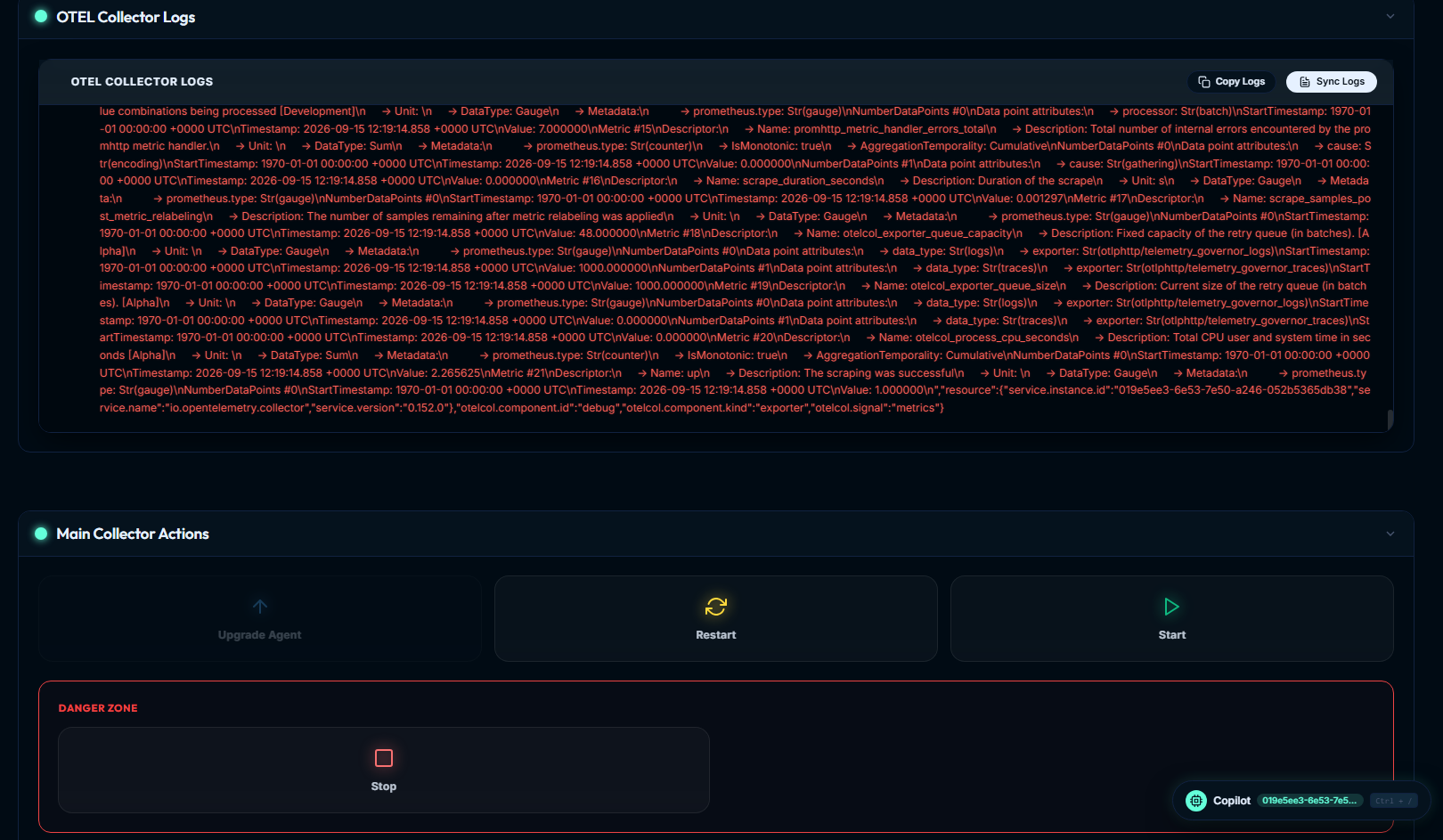
Under the collector details view, you can access real-time logging streams from the target process.
 Expand
OTel Collector Logs
Exposes the raw, real-time stdout and stderr output stream of the primary OTel Collector binary managed by the Supervisor. This is invaluable for detecting:
- Broken network connections to remote backends (e.g. HTTP 503, TLS handshake timeouts, DNS resolution failures).
- Malformed pipeline structures (e.g. processor dropped invalid spans or unmarshaling errors).
- Exporter queue drop rates and rate-limiting throttling responses (
429 Too Many Requests).
Features include:
- Sync Logs: Fetches the freshest buffer of collector observations on demand over OpAMP.
- Copy Logs: One-click clipboard copy of the entire log stream for escalation in ticketing systems or issue tracking.
Sidecar Collector Log
Exposes logs for containerized or secondary collector processes running alongside the main collector under Supervisor oversight. In hybrid architectures, a secondary collector distribution can run adjacent to vendor agents to provide supplementary protocol translation, missing exporters, or localized edge processing without risking primary pipeline stability.
4. Remote Process Control & Collector Actions
From the Main Collector Actions panel, authorized administrators can trigger immediate lifecycle and maintenance actions executed locally by the Supervisor agent:
- Upgrade Agent: Triggers a zero-touch rolling binary upgrade. The Supervisor downloads the targeted package from the central package repository, verifies binary health gates, and rolls back automatically if health validation fails.
- Restart: Gracefully restarts the OpenTelemetry Collector worker process to reload network sockets, refresh credentials, or clear memory caches.
- Start: Spawns the collector process if it was stopped.
- Danger Zone → Stop: Halts the OpenTelemetry child collector process while keeping the host Supervisor daemon active and connected over OpAMP for ongoing monitoring and remote re-activation.
5. Context-Aware AI CoPilot Troubleshooting
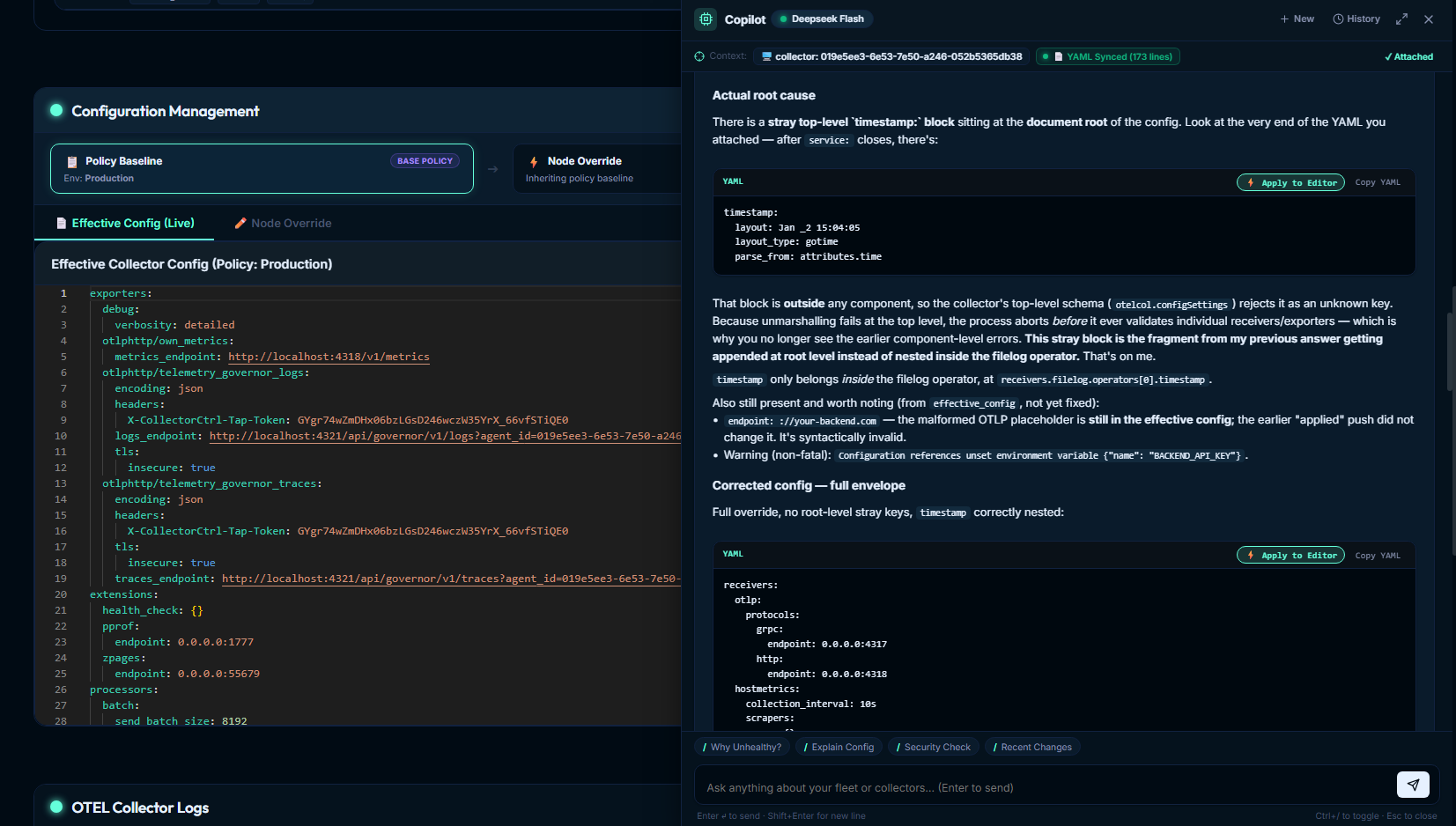
CollectorCtrl integrates a context-aware AI CoPilot directly into the Fleet Overview and Configuration views.
 Expand
Automated Context Attachment
When launching the CoPilot from any collector screen (Ctrl + / or clicking the floating badge), it automatically binds:
- Collector Identity: Instance UUID, hostname, operating system, and running distribution.
- Live Configuration: The exact YAML configuration actively running on the agent (
YAML Synced). - Runtime Health & Observations: Recent error logs, CPU/RSS footprint, and OpAMP status.
Root-Cause Diagnostics & One-Click Fixes
- Syntax & Schema Error Pinpointing: If a collector enters an unhealthy state due to an invalid configuration (e.g. a stray top-level
timestamp:block placed outsideservice:or an invalid processor operator), CoPilot pinpoints the exact line error and explains why the unmarshaler rejected it. - Apply to Editor: Click the ⚡ Apply to Editor button to directly inject the AI-validated YAML fix into the configuration editor, eliminating manual copy-pasting and formatting errors.
- Quick Action Prompts: Instant diagnostics via one-click chips:
Why Unhealthy?: Analyzes recent error logs and supervisor failure audits.Explain Config: Translates complex multi-signal YAML pipelines into plain English.Security Check: Audits endpoints, cleartext tokens, and TLS settings.Recent Changes: Highlights configuration drift between current and prior revisions.